
Quickstart
Connect UltraMemory
Your Claude, ChatGPT, Gemini, Perplexity, OpenClaw, and Hermes never forget — with UltraMemory.
One URL and a key. UltraMemory is a remote MCP server (Streamable HTTP), so any MCP-capable client plugs in with a single block. Pick your client below — everything uses the same Bearer credential.
Start here
Give your AI and your projects: never-forget memory across every tool · ~70% less token spend in our testing · grounding in your real facts instead of guesses and hallucinations · faster delivery with fewer iterations · and less of the token waste that typical LLMs burn on drift. Results may vary.
Start in one click — connect UltraMemory with OAuth on Claude, ChatGPT, or Perplexity. No keys, no setup.
Want to stop burning tokens? The UltraMemory Plugin (one-line install) cut token use ~70% in our testing. Want that PLUS your project locked on persistent grounded truth — fewer iterations, faster delivery, and no tokens wasted on drift? Add the UltraMemory Agent Kit. Results may vary.
Token figure: ~70% in our testing (measured 2026-07-05). Results may vary. This content is informational and not a guarantee of outcome.
OAuth vs Plugin — which path?
OAuth connect — recommended, easiest
One click, no keys, no setup. Best for most people. Available today on Claude, ChatGPT, and Perplexity. You get the memory tools (recall / write / search) wired in — start in seconds.
Plugin / Extension — power users, bundled
A one-line install that bundles the memory tools together with recall-first behavior and the token-saver / harness. Best when you want the deeper, always-on experience. The UltraMemory Plugin cut token use ~70% in our testing. Results may vary.
What's a Plugin?
A Plugin is a one-click bundle: it packages the UltraMemory memory tools together with recall-first behavior and the optional token-saver / harness, so your agent connects and starts recalling without hand-wiring config. Skills and rules work broadly across platforms; hooks and sub-agents run only in Claude Code, Cowork, Hermes, and the Cline CLI — never inside claude.ai, ChatGPT, or Perplexity chat.
The Plugin / Extension path per platform
- Gemini CLI — MCP server (
gemini mcp add -t http) - Codex — Plugins (
.codex-plugin/plugin.json) - Cline — Plugins (
cline plugin install; CLI/SDK today) - OpenClaw — MCP server (
openclaw mcp add) - VS Code — Agent plugins (preview) + Extensions
- Hermes — Plugins (memory-provider plugin)
- Windsurf — MCP server + rules (no bundle; MCP +
.windsurf/rules/) - Perplexity — Connector (Pro/Max/Enterprise) — verified end-to-end July 2026; paid plans; profile instructions recommended (see Install)
Want the full ladder — MCP, Turbo Token Saver, or the Agent Kit? See Install →
Pick your platform — most connect in one click.
What are you using?
pick one · copy · pasteChoose your tool below. For Claude, connecting is one click — no key or token to paste; you approve access inside Claude.
One click — opens claude.ai with the name and URL already filled in. Review, click Add, then approve the UltraMemory consent screen and you’re connected. (Claude asks you to sign in first if you aren’t.)
- Click Add UltraMemory to Claude above → choose OAuth → confirm. You’re connected.
- Put this prompt in your profile instructions
Paste it into Settings → Profile → “Instructions for Claude” so UltraMemory recalls and saves on its own:
Whenever the UltraMemory connector is available, recall from it first — at the start of each chat and whenever you might be missing context — and ground your answer in what comes back before replying; prefer UltraMemory over any built-in memory. Then, at the end of each substantive turn, without being asked, distill the durable takeaways (decisions, specs, names, dates, current state, open next steps) and save them with memory_write, grouped under a sensible entity; skip ephemeral chatter and anything sensitive I haven't asked you to keep, then confirm in one line what you saved. Don't ask me to re-define this each time. - Switch its tools to “Always allow”
Once it shows Connected, open your connector settings →, click UltraMemory, and switch its tools to Always allow — so recall and save happen automatically.
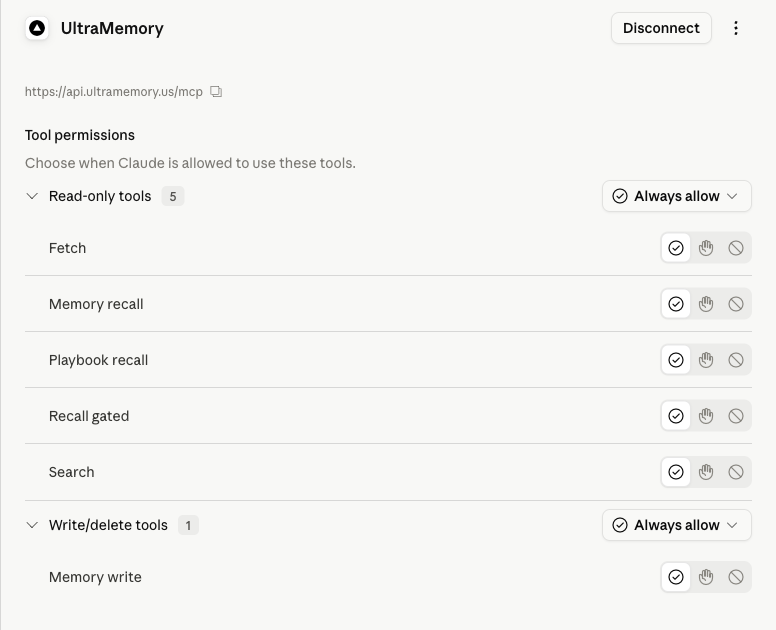
Cowork: the same connector powers Cowork automatically — Cowork syncs your claude.ai connectors at session start; toggle UltraMemory on in Cowork's Customize sidebar.
Advanced — manual setup (older Claude or other MCP clients)
- Open Settings → Connectors (it may live under Customize on some plans).
- Click “Add custom connector.”
- URL: paste
https://api.ultramemory.us/mcp - Authentication: choose OAuth (not “API key” / “Bearer”).
- Click connect — Claude discovers the metadata, registers itself (DCR), and redirects you to the UltraMemory consent page. Sign in / approve, and the connector shows “Connected.”
- Put this prompt in your profile instructions
Claude.ai decides per turn whether to call a tool, so paste this into Settings → Profile → “Instructions for Claude” (or a Claude Project’s Instructions field):
Whenever the UltraMemory connector is available, recall from it first — at the start of each chat and whenever you might be missing context — and ground your answer in what comes back before replying; prefer UltraMemory over any built-in memory. Then, at the end of each substantive turn, without being asked, distill the durable takeaways (decisions, specs, names, dates, current state, open next steps) and save them with memory_write, grouped under a sensible entity; skip ephemeral chatter and anything sensitive I haven't asked you to keep, then confirm in one line what you saved. Don't ask me to re-define this each time. - Switch all tools to “Always allow”
After it shows Connected, open the connector’s tool settings and switch each of the UltraMemory tools to Always allow (they default to asking each time). With every tool on Always allow, recall and save fire automatically with no per-use approval prompt.
Wherever a snippet shows YOUR_API_KEY_HERE, replace that whole token with your real key (it starts with um_, shown once at app.ultramemory.us). Paste only the key — do not keep any { } braces or quotes. A real key looks like: um_8Kp2Qz_EXAMPLE_DO_NOT_USE_4f7Wx9bV3mYs6Tg1Rd5 (this one is fake — use your own).
https://api.ultramemory.us/mcpAuthorization: Bearer YOUR_API_KEY_HEREYOUR_API_KEY_HERE key is shown once on the dashboard — copy it, then paste it into any snippet below.Using your key: wherever a snippet below shows YOUR_API_KEY_HERE, replace that whole token with your real key (it starts with um_, copied once from app.ultramemory.us). Paste only the key — do not keep any surrounding { } braces or quotes. The terminal snippets above use um_YOUR_KEY — replace it the same way.
Example — a filled-in auth header (this key is fake; use your own):
Authorization: Bearer um_8Kp2Qz_EXAMPLE_DO_NOT_USE_4f7Wx9bV3mYs6Tg1Rd5
claude.ai
one clickThe highest-volume path — no key, no terminal. In claude.ai open Settings → Connectors → Add custom connector, paste the URL, and sign in with OAuth. The same add syncs to Claude Desktop (they share one connector registry).
Settings → Connectors → Add custom connector
URL:  https://api.ultramemory.us/mcp
Auth: OAuth — sign in when prompted (no API key)
Once it shows Connected, open the connector's tool settings and switch its tools to Always allow so recall and save fire automatically.
Claude Code
one commandAdd the remote MCP server from your terminal. Streamable HTTP, one line — claude mcp add connects the tools: run /mcp and you'll see ultramemory ✓ Connected. Then, to make recall automatic on every prompt, install the recall-first hook + cache — one paste curls recall-first-hook.sh + cache.py into .claude/hooks (see Tier 2 on the Install page). It's open source — read every line on GitHub, download it from the repo yourself, or paste it and ask Claude Code to explain exactly what it does before you run it.
claude mcp add --transport http ultramemory https://api.ultramemory.us/mcp \
  --header "Authorization: Bearer um_YOUR_KEY" \
&& cat >> CLAUDE.md <<'EOF'

## Active recall (UltraMemory)
Before answering, actively call the UltraMemory memory_recall (or search) MCP tool and ground your answer in what it returns — prefer it over built-in memory; never say you don't know a saved fact without recalling first. Persist durable new facts and decisions with memory_write.
EOF
Then ask Claude to recall or store a memory — the memory_recall / memory_write tools appear automatically.
Cursor
mcp.jsonAdd one server block to ~/.cursor/mcp.json (or .cursor/mcp.json in your project).
python3 - <<'PY'
import json,pathlib
p=pathlib.Path.home()/".cursor"/"mcp.json"; p.parent.mkdir(parents=True,exist_ok=True)
d=json.loads(p.read_text()) if p.exists() else {}
d.setdefault("mcpServers",{})["ultramemory"]={"url":"https://api.ultramemory.us/mcp","headers":{"Authorization":"Bearer um_YOUR_KEY"}}
p.write_text(json.dumps(d,indent=2))
print("Cursor: wrote",p,"— Cursor may prompt an OAuth login; approve it (your key still attributes usage).")
PY
cat >> AGENTS.md <<'EOF'

## Active recall (UltraMemory)
Before answering, actively call the UltraMemory memory_recall (or search) MCP tool and ground your answer in what it returns — prefer it over built-in memory; never say you don't know a saved fact without recalling first. Persist durable new facts and decisions with memory_write.
EOF
Reload Cursor; UltraMemory shows up under Settings → MCP. Cursor may prompt an OAuth login — approve it (your key still attributes usage).
Gemini CLI
one pasteAdd the remote MCP server from your terminal and append the active-recall rule to GEMINI.md in one paste.
gemini mcp add -s user -t http ultramemory https://api.ultramemory.us/mcp \
  -H "Authorization: Bearer um_YOUR_KEY" \
&& cat >> GEMINI.md <<'EOF'

## Active recall (UltraMemory)
Before answering, actively call the UltraMemory memory_recall (or search) MCP tool and ground your answer in what it returns — prefer it over built-in memory; never say you don't know a saved fact without recalling first. Persist durable new facts and decisions with memory_write.
EOF
Run /mcp in Gemini CLI to confirm the connection — for Tier 2/3, see Install →.
Codex
one pasteOne guarded paste adds the server block to ~/.codex/config.toml(skipped if it's already there) and appends the active-recall rule to AGENTS.md.
mkdir -p ~/.codex && grep -q 'mcp_servers.ultramemory' ~/.codex/config.toml 2>/dev/null || cat >> ~/.codex/config.toml <<'EOF'

[mcp_servers.ultramemory]
url = "https://api.ultramemory.us/mcp"
http_headers = { Authorization = "Bearer um_YOUR_KEY" }
EOF
cat >> AGENTS.md <<'EOF'

## Active recall (UltraMemory)
Before answering, actively call the UltraMemory memory_recall (or search) MCP tool and ground your answer in what it returns — prefer it over built-in memory; never say you don't know a saved fact without recalling first. Persist durable new facts and decisions with memory_write.
EOF
Restart Codex to pick up the new server. Prefer keeping the key out of config.toml: replace the http_headers line with bearer_token_env_var = "ULTRAMEMORY_API_KEY" (Codex 0.46+) and export ULTRAMEMORY_API_KEY in your shell — for Tier 2/3, see Install →.
Windsurf
one pasteOne paste safe-merges the server into ~/.codeium/windsurf/mcp_config.json and appends the active-recall rule to AGENTS.md.
python3 - <<'PY'
import json,pathlib
p=pathlib.Path.home()/".codeium"/"windsurf"/"mcp_config.json"; p.parent.mkdir(parents=True,exist_ok=True)
d=json.loads(p.read_text()) if p.exists() else {}
d.setdefault("mcpServers",{})["ultramemory"]={"serverUrl":"https://api.ultramemory.us/mcp","headers":{"Authorization":"Bearer um_YOUR_KEY"}}
p.write_text(json.dumps(d,indent=2))
print("Windsurf: wrote",p)
PY
cat >> AGENTS.md <<'EOF'

## Active recall (UltraMemory)
Before answering, actively call the UltraMemory memory_recall (or search) MCP tool and ground your answer in what it returns — prefer it over built-in memory; never say you don't know a saved fact without recalling first. Persist durable new facts and decisions with memory_write.
EOF
Reload Windsurf to see UltraMemory under its MCP servers. Windsurf interpolates ${env:VAR}: use "Authorization": "Bearer ${env:ULTRAMEMORY_API_KEY}" to keep the key out of the file (an unset variable silently becomes an empty string). Teams/Enterprise: an admin may need to enable the MCP Servers toggle — off by default on Enterprise — for Tier 2/3, see Install →.
Cline
one pasteOne paste safe-merges the server into ~/.cline/data/settings/cline_mcp_settings.json and appends the active-recall rule to AGENTS.md.
python3 - <<'PY'
import json,pathlib
p=pathlib.Path.home()/".cline"/"data"/"settings"/"cline_mcp_settings.json"; p.parent.mkdir(parents=True,exist_ok=True)
d=json.loads(p.read_text()) if p.exists() else {}
d.setdefault("mcpServers",{})["ultramemory"]={"type":"streamableHttp","url":"https://api.ultramemory.us/mcp","headers":{"Authorization":"Bearer um_YOUR_KEY"}}
p.write_text(json.dumps(d,indent=2))
print("Cline: wrote",p)
PY
cat >> AGENTS.md <<'EOF'

## Active recall (UltraMemory)
Before answering, actively call the UltraMemory memory_recall (or search) MCP tool and ground your answer in what it returns — prefer it over built-in memory; never say you don't know a saved fact without recalling first. Persist durable new facts and decisions with memory_write.
EOF
Reload Cline to see UltraMemory under its MCP servers. VS Code extension users: paste the same mcpServers block via the Cline panel > MCP Servers > Configure MCP Servers — for Tier 2/3, see Install →.
OpenClaw
one pasteAdd the remote MCP server from your terminal, reload, and append the active-recall rule to AGENTS.md in one paste.
openclaw mcp add ultramemory --url https://api.ultramemory.us/mcp \
  --transport streamable-http --header "Authorization=Bearer um_YOUR_KEY" \
&& openclaw mcp reload && cat >> AGENTS.md <<'EOF'

## Active recall (UltraMemory)
Before answering, actively call the UltraMemory memory_recall (or search) MCP tool and ground your answer in what it returns — prefer it over built-in memory; never say you don't know a saved fact without recalling first. Persist durable new facts and decisions with memory_write.
EOF
UltraMemory's tools appear on the next OpenClaw turn. Verify the connection with openclaw mcp doctor ultramemory --probe — static checks plus a live connection proof. Changing the header later? openclaw mcp set ultramemory '<full JSON>' replaces the whole server definition; run doctor --probe again after — for Tier 2/3, see Install →.
VS Code
one pasteOne paste registers the server via code --add-mcp and appends the active-recall rule to AGENTS.md.
code --add-mcp '{"name":"ultramemory","type":"http","url":"https://api.ultramemory.us/mcp","headers":{"Authorization":"Bearer um_YOUR_KEY"}}' \
&& cat >> AGENTS.md <<'EOF'

## Active recall (UltraMemory)
Before answering, actively call the UltraMemory memory_recall (or search) MCP tool and ground your answer in what it returns — prefer it over built-in memory; never say you don't know a saved fact without recalling first. Persist durable new facts and decisions with memory_write.
EOF
Open the Chat view and enable UltraMemory under MCP servers — for Tier 2/3, see Install →.
Claude Desktop
connectorsPrimary method — native remote-connector support, the same as claude.ai (Desktop shares the claude.ai connector registry): Settings → Connectors → Add custom connector → paste the URL → Connect (OAuth). Legacy fallback, for old Desktop versions without the connector UI only — bridge stdio → Streamable HTTP with mcp-remote in claude_desktop_config.json:
{
  "mcpServers": {
    "ultramemory": {
      "command": "npx",
      "args": ["mcp-remote@latest", "https://api.ultramemory.us/mcp",
               "--header", "Authorization: Bearer YOUR_API_KEY_HERE"]
    }
  }
}
The config block is the legacy fallback only — on current Desktop builds use the connector (OAuth, no key). After editing the config file, fully quit and reopen Claude Desktop.
ChatGPT
developer modeTurn on Developer mode (Settings → Security and login), then add a custom connector under Settings → Apps: use the URL as the MCP server and sign in with OAuth — or add the Bearer header as a custom authentication header.
Server URL:  https://api.ultramemory.us/mcp
Auth header: Authorization: Bearer YOUR_API_KEY_HERE
Connector writes are proven on ChatGPT Plus via developer-mode connectors; reads work on plans with connectors enabled. The same one URL + key works in the OpenAI Agents SDK — pass it as a remote MCP (Streamable HTTP) server.
Hermes
memory providerThe deep path. Install the provider plugin and point Hermes at it — UltraMemory then auto-injects relevant memory before every turn, captures after, and consolidates on session end.
pip install ultramemory-mcp

ultramemory enable --key YOUR_API_KEY_HERE
ultramemory enablewrites your key and selects UltraMemory as the Hermes memory provider for you — no hand-edited yaml. This is the “it just works and self-learns” experience MCP structurally can't offer — lifecycle hooks, not just tool calls. Also published as ultramemory-hermes.
curl / REST
directNo client? Call the REST API straight over HTTP to confirm your key — plain recall works on every tier.
curl https://api.ultramemory.us/api/v1/recall \
  -H "Authorization: Bearer YOUR_API_KEY_HERE" \
  -H "Content-Type: application/json" \
  -d '{"query": "what did we decide about auth?"}'
Every REST call uses the same header: Authorization: Bearer YOUR_API_KEY_HERE. Swap /recall for /recall/gated to add the answer / verify / abstain gate — every feature is on every plan.
Verify it works
Confirm the connection in 30 seconds
Start with plain recall — it works on every tier and is the quickest way to prove your key is live. Write a memory, then recall it back.
# 1) write a memory
curl https://api.ultramemory.us/api/v1/permanent \
  -H "Authorization: Bearer YOUR_API_KEY_HERE" \
  -H "Content-Type: application/json" \
  -d '{"entity": "auth", "key": "decision", "value": "We chose OAuth 2.1 with PKCE."}'

# 2) recall it — plain recall, works on every tier
curl https://api.ultramemory.us/api/v1/recall \
  -H "Authorization: Bearer YOUR_API_KEY_HERE" \
  -H "Content-Type: application/json" \
  -d '{"query": "what did we decide about auth?"}'
optional See the metamemory gate. Gated recall adds the answer / verify / abstain decision on top of recall — on every plan, like every feature. On a fresh tenant with no grounded memory, the gate correctly abstains— that's the system working, not an error.
# 3) optional: run recall through the metamemory gate
curl https://api.ultramemory.us/api/v1/recall/gated \
  -H "Authorization: Bearer YOUR_API_KEY_HERE" \
  -H "Content-Type: application/json" \
-d '{"query": "what did we decide about auth?"}'{ "decision": "abstain",
"context_block": "No sufficiently grounded memory. Retrieve or ask before asserting." }A 401 means the key is missing or wrong — re-copy it from the dashboard. A 429 means you hit your rate or usage limit; check the meters in your workspace. A 402 means your subscription payment is past due — fix billing from your workspace. Gated recall is not tier-gated: every feature, including the metamemory gate, is on every plan. Health check: https://api.ultramemory.us/healthz.
How updates work
Bitemporal supersede
Facts are bitemporal. Writing to the same entity + keysupersedes the prior active fact: the old row isn't deleted — it retires with its dates (valid_from / valid_to preserved), and recall serves only active facts from that moment on. Pass as_offor time-travel (“what was true in March?”). Two more layers keep answers honest: decay de-ranks knowledge that goes unused, and the metamemory gate abstains on weak or conflicting evidence instead of guessing.
1 · A part gets replaced
Your service company documents that the H1000's compressor part was superseded. Write the new fact to the same entity + key— the old one retires with its dates, and “what was true in March” is still answerable.
# the H1000's compressor part is superseded — same entity + key, new value
curl https://api.ultramemory.us/api/v1/permanent \
  -H "Authorization: Bearer YOUR_API_KEY_HERE" \
  -H "Content-Type: application/json" \
  -d '{"entity": "H1000", "key": "compressor_part", "value": "Use part P-2041 (replaces P-1050 as of June 2026)."}'

# → { "fact_id": "…", "deduped": false, "superseded": 1 }
#   the prior fact retired: its valid_to is set; the new fact answers from now on

# time-travel: what was true in March?
curl https://api.ultramemory.us/api/v1/recall \
  -H "Authorization: Bearer YOUR_API_KEY_HERE" \
  -H "Content-Type: application/json" \
  -d '{"query": "H1000 compressor part", "as_of": "2026-03-15T00:00:00Z"}'
2 · A product is discontinued
Your catalog sync says item #2043 is gone. A salesperson asks their AI about it and gets “discontinued as of June” — not a confident yes on something you no longer sell.
# the catalog sync marks item #2043 discontinued
curl https://api.ultramemory.us/api/v1/permanent \
  -H "Authorization: Bearer YOUR_API_KEY_HERE" \
  -H "Content-Type: application/json" \
  -d '{"entity": "item-2043", "key": "status", "value": "Discontinued as of June 2026 — quote item-2051 instead."}'

# the salesperson's AI asks — recall serves the current truth, gated recall
# abstains rather than bluff when the evidence is weak or conflicting
curl https://api.ultramemory.us/api/v1/recall/gated \
  -H "Authorization: Bearer YOUR_API_KEY_HERE" \
  -H "Content-Type: application/json" \
  -d '{"query": "can I still quote item 2043?"}'
3 · A policy is rewritten
Upload the new handbook into the company knowledge layer (Teams and up, owners and admins). The engine matches the new policies to the old ones, supersedes what changed, and queues anything ambiguous for a one-click admin review — nobody scrubs the memory by hand.
In your dashboard, open Memory → Global memory → Add documentsand drag & drop the new handbook (PDF, DOCX, Markdown, plain text, or CSV — multiple files at once). Each upload becomes a queued ingest job: matched policies supersede the old ones, and ambiguous matches wait as proposals for one-click admin review.
Document caps by plan: Teams 25/day · 300 total, Business 100/day · 1,000 total, Enterprise 200/day · 2,000 total. Not available on Free/Pro.
Update a fact once, and every member's AI knows it from that moment. Old truth retires. Current truth answers. Nothing is ever silently made up.
Comparing memory tools? See the detailed comparison — names, sources, benchmarks →
Open source
The UltraMemory client surface is open source (Apache-2.0) — the connect snippets, the Hermes provider package, and a Claude Code recall hook all live in one repo: github.com/LogicLabsAI/ultramemory-mcp ⭐.
Want deterministic memory injection before every prompt in Claude Code? Add the UserPromptSubmit recall hook → then pair it with an active-recall rule in CLAUDE.mdfor the agent's own mid-task lookups (the hook and the rule work together).
Need a hand?
Open your dashboard to manage keys, usage, and plan — or email us and we'll help you connect.
Tools reference — the nine MCP tools, parameter by parameter →