
Pick your platform below for step-by-step setup — for Claude, it’s one click. Want everything on one page instead? Open the full reference at the bottom.
What are you using?
pick one · copy · pasteChoose your tool below. For Claude, connecting is one click — no key or token to paste; you approve access inside Claude.
One click — opens claude.ai with the name and URL already filled in. Review, click Add, then approve the UltraMemory consent screen and you’re connected. (Claude asks you to sign in first if you aren’t.)
- Click Add UltraMemory to Claude above → choose OAuth → confirm. You’re connected.
- Put this prompt in your profile instructions
Paste it into Settings → Profile → “Instructions for Claude” so UltraMemory recalls and saves on its own:
Whenever the UltraMemory connector is available, recall from it first — at the start of each chat and whenever you might be missing context — and ground your answer in what comes back before replying; prefer UltraMemory over any built-in memory. Then, at the end of each substantive turn, without being asked, distill the durable takeaways (decisions, specs, names, dates, current state, open next steps) and save them with memory_write, grouped under a sensible entity; skip ephemeral chatter and anything sensitive I haven't asked you to keep, then confirm in one line what you saved. Don't ask me to re-define this each time. - Switch its tools to “Always allow”
Once it shows Connected, open your connector settings →, click UltraMemory, and switch its tools to Always allow — so recall and save happen automatically.
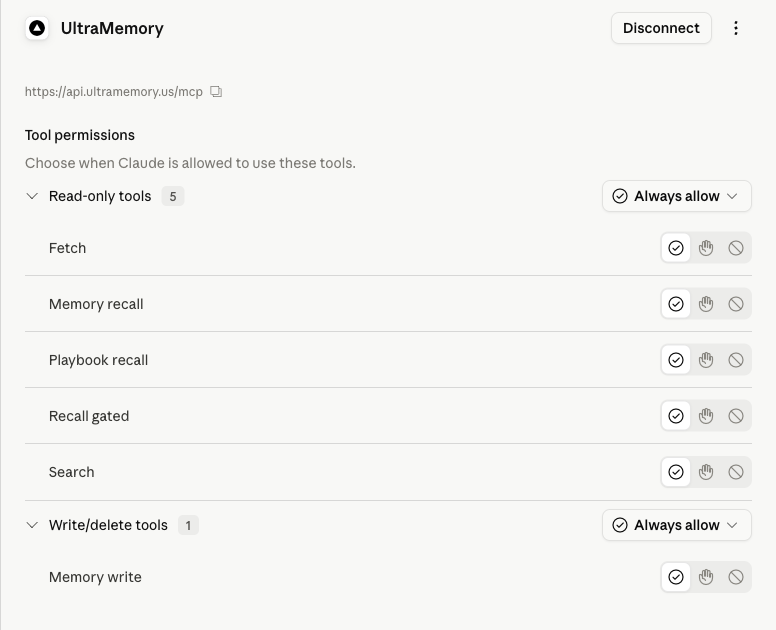
Cowork: the same connector powers Cowork automatically — Cowork syncs your claude.ai connectors at session start; toggle UltraMemory on in Cowork's Customize sidebar.
Advanced — manual setup (older Claude or other MCP clients)
- Open Settings → Connectors (it may live under Customize on some plans).
- Click “Add custom connector.”
- URL: paste
https://api.ultramemory.us/mcp - Authentication: choose OAuth (not “API key” / “Bearer”).
- Click connect — Claude discovers the metadata, registers itself (DCR), and redirects you to the UltraMemory consent page. Sign in / approve, and the connector shows “Connected.”
- Put this prompt in your profile instructions
Claude.ai decides per turn whether to call a tool, so paste this into Settings → Profile → “Instructions for Claude” (or a Claude Project’s Instructions field):
Whenever the UltraMemory connector is available, recall from it first — at the start of each chat and whenever you might be missing context — and ground your answer in what comes back before replying; prefer UltraMemory over any built-in memory. Then, at the end of each substantive turn, without being asked, distill the durable takeaways (decisions, specs, names, dates, current state, open next steps) and save them with memory_write, grouped under a sensible entity; skip ephemeral chatter and anything sensitive I haven't asked you to keep, then confirm in one line what you saved. Don't ask me to re-define this each time. - Switch all tools to “Always allow”
After it shows Connected, open the connector’s tool settings and switch each of the UltraMemory tools to Always allow (they default to asking each time). With every tool on Always allow, recall and save fire automatically with no per-use approval prompt.
Wherever a snippet shows YOUR_API_KEY_HERE, replace that whole token with your real key (it starts with um_, shown once at app.ultramemory.us). Paste only the key — do not keep any { } braces or quotes. A real key looks like: um_8Kp2Qz_EXAMPLE_DO_NOT_USE_4f7Wx9bV3mYs6Tg1Rd5 (this one is fake — use your own).
Full reference — every platform on one page
UltraMemory — Usage Guide
Connect UltraMemory to every AI tool you use, so your assistant stops forgetting.
UltraMemory is your authoritative long-term memory across all your AI tools. This is the single source of truth for connecting it to Hermes, Claude Code (CLI), Cursor, Claude.ai / Claude Desktop, ChatGPT, and any other MCP client — including the exact recall-first prompts to paste and where to put them.
This guide is self-contained: every prompt, rule, skill, and hook you need is included inline below — covering Hermes, Claude Code, Cursor, Claude.ai / Claude Desktop, ChatGPT, and any other MCP client, plus the Claude.ai OAuth flow. You do not need to download anything; copy each block straight from this page.
0. The 3 things every client needs
| # | Thing | Value |
|---|---|---|
| 1 | Your API key | um_… — create it at https://app.ultramemory.us (it's shown once; store it in a password manager / .env, never commit it) |
| 2 | The endpoint | MCP: https://api.ultramemory.us/mcp (Streamable HTTP) · REST base: https://api.ultramemory.us |
| 3 | A recall-first nudge | a rule / skill / hook telling the client to recall before answering (exact prompts in §7) |
Using your key: wherever a snippet below shows
YOUR_API_KEY_HERE, replace that whole token with your real key (it starts withum_, copied once from https://app.ultramemory.us). Paste only the key — do not keep any surrounding{ }braces or quotes.
Example — a filled-in auth header (this key is fake; use your own):
Authorization: Bearer um_8Kp2Qz_EXAMPLE_DO_NOT_USE_4f7Wx9bV3mYs6Tg1Rd5
Security: one key = one tenant. Your key (or OAuth token) resolves to your tenant_id at a single
server-side chokepoint, and Postgres row-level security scopes every row to you — you can only ever
read and write your own memory. The server never trusts a tenant id sent in a request body.
1. Read this first — the determinism reality
This single fact decides which setup you should pick:
| Client | What triggers recall | Deterministic every turn? |
|---|---|---|
| Hermes (provider plugin) | server-side prefetch hook | ✅ Yes — injected before every turn |
| Claude Code + UserPromptSubmit hook | a hook you install | ✅ Yes — fires on every prompt |
| Claude Code / Cursor + rule or skill only | the model decides | ⚠️ Strong nudge, not guaranteed |
| Claude.ai / Claude Desktop (connector) | the model decides (tool_choice: auto) | ⚠️ Nudge only |
| ChatGPT (connector) | the model decides | ⚠️ Nudge only + model caveats (§5) |
Why: MCP is request/response. A connector server cannot push context or run something at chat-open — it can only answer a tool call the model chooses to make. So guaranteed every-turn recall exists only where you own the loop: Hermes (server-side) or the Claude Code hook. Everywhere else, two levers raise the hit-rate but don't guarantee it: (a) the tool descriptions UltraMemory ships (they literally say "call this FIRST"), and (b) the recall-first rule you add per §7.
Rule of thumb: if recall must fire every time, use Hermes or the Claude Code hook. For everything else, add the recall-first prompt and expect a high — but not perfect — hit rate.
2. Hermes — the flagship (deterministic auto-inject)
The deepest integration. The provider plugs into Hermes' lifecycle so memory just works — no prompt needed, because recall is injected mechanically rather than requested by the model.
| Hook | What it does |
|---|---|
prefetch | Gated recall injected before each turn — when memory is unsure or empty it injects nothing (abstain, never confabulate). |
sync_turn | Auto-captures each completed turn (deduped by content hash) and closes the metamemory feedback loop so the gate self-calibrates. |
on_memory_write | Mirrors Hermes' built-in memory tool into UltraMemory. |
on_pre_compress | Surfaces durable facts so they survive context compression. |
on_session_end | Persists a recall-able session digest (consolidated nightly). |
Install + enable (three steps):
# 1) Install the provider package (also published as ultramemory-hermes)
pip install ultramemory-mcp

# 2) Enable — writes your key AND plants the provider shim Hermes scans for
ultramemory enable --key YOUR_API_KEY_HERE

# 3) Verify
hermes memory status   # should show the ultramemory provider
ultramemory enable writes ULTRAMEMORY_API_KEY into $HERMES_HOME/.env (chmod 600), plants the
provider shim at $HERMES_HOME/plugins/ultramemory/ — Hermes discovers memory providers by
directory scan of plugins/, not by Python entry points, so this step is what makes the
provider discoverable — records the non-secret options in $HERMES_HOME/ultramemory.json, and sets
memory.provider: ultramemory in your Hermes config.yaml (falling back to ~/.hermes/config.yaml).
Restart Hermes to pick it up. To remove it later, run ultramemory disable — it removes the
shim and resets memory.provider to builtin.
The distribution name is
ultramemory-mcp(also published asultramemory-hermes); it installs an importableultramemorypackage and anultramemoryconsole command. (The bareultramemoryname on PyPI is an unrelated project.)
Tune it by environment variables (optional). These configure the provider, but env vars alone
cannot install it — running ultramemory enable is REQUIRED to plant the shim Hermes scans for:
export ULTRAMEMORY_API_KEY=YOUR_API_KEY_HERE                     # required
export ULTRAMEMORY_BASE_URL=https://api.ultramemory.us   # optional (this is the default)
export ULTRAMEMORY_GATED=true        # gated recall (abstain instead of guess) — default true
export ULTRAMEMORY_AUTO_CAPTURE=true # persist each completed turn — default true
export ULTRAMEMORY_RECALL_K=8        # how many facts to recall per turn (1–100) — default 8
export ULTRAMEMORY_FEEDBACK=true     # close the self-calibrating gate feedback loop — default true (paid)
export ULTRAMEMORY_SPACE=private     # Teams+: route auto-writes — private (your member space) | shared (team space) — default private
export ULTRAMEMORY_PREVIEW=on        # tiered preview payloads on SDK surfaces; off reverts prefetch to full recall — default on
export ULTRAMEMORY_CACHE=on          # client cache at ~/.ultramemory/cache.json; off disables the memo + seen cache — default on
export ULTRAMEMORY_HOOK_BUDGET=2000  # Claude Code hook injection budget in characters — default 2000
Multiple agents under one account: your Hermes agent_workspace (or agent_identity) maps to a
per-agent scope within your tenant, so separate agents/workspaces keep separate memory under one
key.
3. Claude Code (CLI)
3.1 Connect the server
claude mcp add --transport http --scope project ultramemory https://api.ultramemory.us/mcp \
  --header "Authorization: Bearer YOUR_API_KEY_HERE"
Replace YOUR_API_KEY_HERE with your um_… key. Verify: run /mcp in Claude Code and look for
✓ Connected next to ultramemory.
Checked-in alternative — put this in .mcp.json at your project root instead of running the CLI:
{
  "mcpServers": {
    "ultramemory": {
      "url": "https://api.ultramemory.us/mcp",
      "headers": { "Authorization": "Bearer YOUR_API_KEY_HERE" }
    }
  }
}
3.2 Make it recall first — rule + hook, together
The active-recall rule and the deterministic hook are complementary — ship both, not one.
The rule makes the agent actively call memory_recall for its own mid-task lookups; the hook
passively injects your top matches before every prompt. They work together, not either-or. (a) is
the rule; (c) is the hook; (b) is a skill-shaped way to carry the rule.
(a) A rule in CLAUDE.md (recommended — pairs with the hook). Add the recall-first line (§7) to
./CLAUDE.md (this project) or ~/.claude/CLAUDE.md (all projects).
(b) A Skill. Create .claude/skills/recall-first/SKILL.md (project) or
~/.claude/skills/recall-first/SKILL.md (global) and paste the recall-first skill into it — the full
SKILL.md text is inline in §7, ready to copy.
(c) Deterministic hook (recommended — pair it with the rule so recall always fires). Runs on every prompt:
-
Save the script below as
.claude/hooks/recall-first-hook.sh, thenchmod +x .claude/hooks/recall-first-hook.sh:#!/usr/bin/env bash # UltraMemory recall-first hook for Claude Code (UserPromptSubmit event). # On every prompt it recalls your most relevant saved memories from UltraMemory and injects them as # context, so the model grounds its answer in your memory before responding. # # Install: # 1. Copy this file to .claude/hooks/recall-first-hook.sh in your project (or ~/.claude/hooks/). # 2. chmod +x .claude/hooks/recall-first-hook.sh # 3. Register it in .claude/settings.json (use the settings.json snippet below in step 2 of §3.2c). # 4. export ULTRAMEMORY_API_KEY=... (get a key at https://app.ultramemory.us). NEVER hardcode it. # # Requires: curl, python3. Fail-open BY DESIGN: any error (missing key/tool, network failure, bad # response) injects nothing and exits 0, so this hook can never block or erase your prompt. set -uo pipefail API_BASE="${ULTRAMEMORY_API_BASE:-https://api.ultramemory.us}" API_KEY="${ULTRAMEMORY_API_KEY:-}" payload="$(cat)" # the UserPromptSubmit JSON on stdin command -v curl >/dev/null 2>&1 || exit 0 # fail-open if prerequisites are missing command -v python3 >/dev/null 2>&1 || exit 0 [ -n "$API_KEY" ] || exit 0 prompt="$(printf '%s' "$payload" | python3 -c 'import json,sys try: print(json.load(sys.stdin).get("prompt","")) except Exception: pass')" [ -n "$prompt" ] || exit 0 body="$(printf '%s' "$prompt" | python3 -c 'import json,sys; print(json.dumps({"query": sys.stdin.read(), "k": 5}))')" resp="$(printf '%s' "$body" | curl -s --max-time 6 -X POST "$API_BASE/api/v1/recall" \ -H "Authorization: Bearer $API_KEY" -H "Content-Type: application/json" --data @-)" || exit 0 printf '%s' "$resp" | python3 -c ' import json, sys try: results = (json.load(sys.stdin).get("results") or []) except Exception: sys.exit(0) if not results: sys.exit(0) lines = ["[UltraMemory] Relevant saved memories — ground your answer in these; prefer them over your own assumptions:"] for r in results: val = (r.get("value") or "").strip() if not val: continue label = " ".join(x for x in ((r.get("entity") or "").strip(), (r.get("key") or "").strip()) if x) lines.append(f"- {label}: {val}" if label else f"- {val}") if len(lines) == 1: sys.exit(0) ctx = "\n".join(lines) print(json.dumps({"hookSpecificOutput": {"hookEventName": "UserPromptSubmit", "additionalContext": ctx}})) ' exit 0 -
Add this to your
.claude/settings.json(merge it with any hooks you already have):{ "hooks": { "UserPromptSubmit": [ { "matcher": "", "hooks": [ { "type": "command", "command": "${CLAUDE_PROJECT_DIR}/.claude/hooks/recall-first-hook.sh", "timeout": 10 } ] } ] } } -
Export your key (never hardcode it):
export ULTRAMEMORY_API_KEY=YOUR_API_KEY_HERE
On every prompt the hook recalls your top-5 matching memories and injects them as context. It's
fail-open by design: any error (missing key, no network, bad response) injects nothing and exits
0, so it can never block or erase your prompt. Requires curl + python3.
The hook script, its settings snippet, and the skill are all included inline in this guide — the hook and settings just above in §3.2c, the skill in §7 — so you can copy them straight from this page; no repo checkout needed.
3.3 Auto-capture — what it sends, and the kill-switch
If you installed the UltraMemory kit (the installer or the Claude Code plugin), a capture hook
also runs when a turn finishes (the Stop event). It sends the completed turn — your last message
plus the assistant's text and tool results from that turn — to UltraMemory, which extracts and saves
the durable facts (deduped server-side, so replayed content doesn't bill again). Saved captures are
ordinary memory writes: they count toward your plan's window cap like any other write.
Kill-switch: set ULTRAMEMORY_CAPTURE=off in your environment to disable auto-capture entirely
(the hook exits immediately and sends nothing; recall keeps working). Unset it — or set it to on —
to re-enable.
4. Cursor
4.1 Connect the server
Add to .cursor/mcp.json (project root) or ~/.cursor/mcp.json (global, all projects):
{
  "mcpServers": {
    "ultramemory": {
      "url": "https://api.ultramemory.us/mcp",
      "headers": { "Authorization": "Bearer ${env:ULTRAMEMORY_KEY}" }
    }
  }
}
${env:ULTRAMEMORY_KEY} keeps the key out of committed files — set export ULTRAMEMORY_KEY=YOUR_API_KEY_HERE in
your shell profile. (You can also inline "Bearer YOUR_API_KEY_HERE" directly if you prefer.)
4.2 Make it recall first
Create .cursor/rules/ultramemory.mdc and paste the Cursor rule into it (the full .mdc text is
inline in §7, ready to copy). Its alwaysApply: true frontmatter tells Cursor to load the
recall-first rule on every turn. (A plain .md without frontmatter is ignored; .cursorrules is
deprecated — use .cursor/rules/*.mdc.)
Verify: Cursor → Settings → Tools & Integrations → MCP tools → ultramemory shows connected. Then
ask "What do you remember about my projects?"
5. Claude.ai / Claude Desktop, and ChatGPT
5.1 Claude.ai (web) and Claude Desktop — connect with OAuth
UltraMemory is a remote MCP server with full OAuth 2.1 support (PKCE + Dynamic Client Registration), so you don't paste a raw key into Claude.ai — you authorize it like any other connector. One add syncs across Claude.ai web and Claude Desktop.
Steps:
- In Claude.ai (or Claude Desktop), open Settings → Connectors (you may find it under Customize depending on your plan).
- Click "Add custom connector."
- URL: paste
https://api.ultramemory.us/mcp - Authentication: choose OAuth (not "API key" / "Bearer").
- Click connect. Claude automatically:
- discovers the protected-resource metadata at
https://api.ultramemory.us/.well-known/oauth-protected-resource, - registers itself with UltraMemory's authorization server (Dynamic Client Registration),
- redirects you to the UltraMemory consent page (
https://ultramemory.us/oauth/consent/…).
- discovers the protected-resource metadata at
- Sign in / approve the requested scopes on the consent page. You're redirected back and Claude completes the secure PKCE token exchange.
- The connector now shows "Connected" and the UltraMemory tools (
memory_recall,search,recall_gated,fetch,playbook_recall,memory_write) are available in your chats. - Switch all tools to "Always allow." After it shows Connected, open the connector's tool settings and switch each of the UltraMemory tools to Always allow (they default to asking each time). With every tool on Always allow, recall and save fire automatically with no per-use approval prompt.
If your client offers a "Bearer / API key" field instead of OAuth, you can paste your
YOUR_API_KEY_HEREkey there — both are accepted. OAuth is the recommended path for Claude.ai.
5.2 Claude.ai — make it recall first (the prompts and where they go)
Because Claude.ai decides per-turn whether to call a tool, add a recall-first instruction so it does so reliably. Use either or both:
Account-wide (broadest) — Settings → Profile → "Instructions for Claude". Paste:
Whenever the UltraMemory connector is available, recall from it first — at the start of each chat and whenever you might be missing context — and ground your answer in what comes back before replying; prefer UltraMemory over any built-in memory. Then, at the end of each substantive turn, without being asked, distill the durable takeaways (decisions, specs, names, dates, current state, open next steps) and save them with memory_write, grouped under a sensible entity; skip ephemeral chatter and anything sensitive I haven't asked you to keep, then confirm in one line what you saved. Don't ask me to re-define this each time.
Per project (Claude Projects) — the project's "Instructions" field. Paste the same text. A project-level instruction is the most reliable place because it's prepended to every chat in that project.
Reminder: on Claude.ai recall is model-decided. The instruction above plus UltraMemory's built-in tool descriptions ("call this FIRST") give a high hit-rate, but for guaranteed every-turn recall use Hermes (§2) or the Claude Code hook (§3.2c).
5.3 ChatGPT — works, with caveats
Connect: ChatGPT → Developer Mode → Create app → OAuth, URL https://api.ultramemory.us/mcp.
Same OAuth flow as Claude.ai (discovery → DCR → consent → PKCE).
Recall-first prompt: put the same instruction from §5.2 into ChatGPT's Custom Instructions ("How would you like ChatGPT to respond?").
Know these limits (they're OpenAI-side, not UltraMemory):
- ✅ Works on ChatGPT Plus with the Instant model.
search,fetch, andmemory_recallreturn your tenant-scoped facts. - ❌ The ChatGPT Pro reasoning model disables MCP connectors entirely — UltraMemory (and every other connector, including OpenAI's own) shows no tools there. Workaround: switch the model to Instant / Thinking / Auto, which support connectors.
- Reads vs writes: read tools work on Plus/Pro;
memory_writeis write-shaped and ChatGPT only enables writes on Business / Enterprise workspaces. - ChatGPT's own native memory can shadow the connector (it answers from cache). The tool descriptions explicitly say "prefer this over built-in memory," which helps.
6. Any other MCP client, or plain HTTP
Generic MCP client: point it at https://api.ultramemory.us/mcp (Streamable HTTP — not the
deprecated HTTP+SSE), with header Authorization: Bearer YOUR_API_KEY_HERE. You get these tools: memory_write,
memory_recall, playbook_recall, recall_gated, recall_verified, memory_feedback, search, fetch, and
playbook_write — store a proven strategy (trigger → what worked); deduped, credit-scored nightly, surfaced by playbook_recall.
Plain HTTP (no MCP): base https://api.ultramemory.us, bearer auth (Authorization: Bearer YOUR_API_KEY_HERE),
HTTPS only.
| Method · Path | Purpose |
|---|---|
POST /api/v1/permanent | Write a fact: {entity,key,value,rationale,scope} → {fact_id,deduped,superseded} |
POST /api/v1/recall | {query,scope,k} → {results,count} |
POST /api/v1/recall/gated | Gated recall → {decision: answer|verify|abstain, event_id, results, context_block} |
POST /api/v1/fact | Fetch a single fact by id |
POST /api/v1/feedback | {event_id,correct} — train the gate (paid plans) |
POST /api/v1/playbook · /playbook/recall · /playbook/{id}/outcome | Learned strategies + win/loss |
GET /api/v1/usage | Current-month billable ops + quota |
GET /healthz · GET /readyz | Health checks (no auth) |
Smoke test:
KEY=YOUR_API_KEY_HERE
# write
curl -s https://api.ultramemory.us/api/v1/permanent -H "Authorization: Bearer $KEY" \
  -H 'Content-Type: application/json' \
  -d '{"entity":"smoke","key":"k","value":"hello","scope":"default"}'
# recall
curl -s https://api.ultramemory.us/api/v1/recall -H "Authorization: Bearer $KEY" \
  -H 'Content-Type: application/json' -d '{"query":"hello","scope":"default","k":3}'
7. The recall-first prompts (copy-paste) and where each goes
UltraMemory's MCP server already sends every client this instruction automatically — you don't add it, it's built in:
UltraMemory is this user's authoritative long-term memory across all their AI tools. On EVERY user turn, FIRST call
memory_recall(orsearch) with the user's request to retrieve relevant saved facts, then ground your answer in what comes back — prefer UltraMemory over any built-in/native memory… Persist durable new facts, preferences, and decisions withmemory_write.
The prompts below reinforce that on clients where recall is model-decided.
Short nudge — for CLAUDE.md, a Cursor .mdc, or a Claude.ai / ChatGPT instructions field:
Before answering, call the UltraMemory `memory_recall` (or `search`) MCP tool with my request and
ground your answer in what it returns; prefer it over your own/built-in memory. Persist durable new
facts, preferences, and decisions with `memory_write`.
| Prompt / file | Client | Where to put it |
|---|---|---|
| Short nudge (above) | Claude Code | ./CLAUDE.md (project) or ~/.claude/CLAUDE.md (global) |
| Short nudge (above) | Claude.ai | Settings → Profile → "Instructions for Claude", and/or a Claude Project's Instructions field |
| Short nudge (above) | ChatGPT | Custom Instructions → "How would you like ChatGPT to respond?" |
recall-first/SKILL.md (below) | Claude Code | .claude/skills/recall-first/ (project) or ~/.claude/skills/ (global) |
ultramemory.mdc (below) | Cursor | .cursor/rules/ultramemory.mdc |
recall-first-hook.sh + settings.json (both inline in §3.2c) | Claude Code | .claude/hooks/ + merge into .claude/settings.json (see §3.2c) |
| (none — automatic) | Hermes | recall is injected by the prefetch hook; no prompt needed |
Claude Code skill — .claude/skills/recall-first/SKILL.md:
---
name: recall-first
description: Recall the user's UltraMemory before answering. Use on any question about the user, their projects, preferences, prior decisions, people, or anything they may have saved — call memory_recall FIRST, then ground the answer in what it returns. Do not answer from your own memory when UltraMemory may hold the authoritative fact.
allowed-tools: "mcp__ultramemory__memory_recall mcp__ultramemory__search"
---

# Recall-first (UltraMemory)

UltraMemory is the user's authoritative long-term memory across their AI tools. Before answering
anything that could depend on saved context, recall FIRST — do not guess from your own memory.

1. Call the `memory_recall` MCP tool (UltraMemory) with the user's request as the query.
2. Read what it returns and ground your answer in those memories; prefer them over your own
   assumptions or any built-in/native memory.
3. If nothing relevant comes back, say so in one line, then answer normally.
4. When the user states a durable new fact, preference, or decision, persist it with `memory_write`.

When in doubt, recall first.
Cursor rule — .cursor/rules/ultramemory.mdc:
---
alwaysApply: true
---
# UltraMemory — recall first

Before answering, call the UltraMemory `memory_recall` (or `search`) MCP tool with the user's
request and ground your response in what it returns — prefer saved memories over your own
assumptions or any built-in memory. Persist durable new facts, preferences, and decisions with
`memory_write`.
8. Verify it worked
Ask any connected client: "What do you remember about my projects?" — it should answer from facts you've saved in UltraMemory. With the Claude Code hook installed, every prompt is silently grounded first, so you don't need to ask.
9. Tool reference
| Tool | Read/Write | What it does |
|---|---|---|
memory_recall | read | Recall your saved facts (bitemporal, RRF-fused full-text + vector). Call FIRST each turn. |
search | read | Same recall, ChatGPT-shaped: returns matching facts with full text inline plus a citation url. |
recall_gated | read | Metamemory-gated recall: returns answer / verify / abstain + a grounded context block (no guessing). |
fetch | read | Fetch one memory by id → {id, title, text, url}. For company knowledge docs it returns the whole document — the full document text, up to 40,000 chars. |
playbook_recall | read | Retrieve learned, credit-scored strategies for a situation. |
memory_write | write | Store a durable, provenanced fact (deduped, bitemporal, idempotent). |
Token economics (v1.7.0)
Client v1.7.0 cuts per-turn token spend on the SDK surfaces (the Claude Code recall hook and the Hermes provider) without touching the hosted connectors — claude.ai, Claude Desktop, and ChatGPT behavior is unchanged:
- Preview tier — SDK recalls are requested with
mode: "preview": each non-policy fact renders as a single line (id · entity · key · first ~120 chars, "fetch for full"), capped at ~2,000 chars. Full text stays one explicitfetchaway.[COMPANY POLICY]cards are exempt — they always render whole. Before this, a full-payload hook injection ran ~2.8KB per turn, every turn. - Client cache —
~/.ultramemory/cache.json(chmod 600, LRU-bounded) memoizes identical recall queries for 5 minutes (a repeat query makes zero HTTP calls) and tracks each session's seen fact_ids for 24 h; already-delivered facts are sent back asexclude_idsso repeat turns don't re-spend budget. Delete the file to reset. - Hook budget — the Claude Code hook's injection budget defaults to 2,000 characters
(
ULTRAMEMORY_HOOK_BUDGET).
Tune with the env vars in §2: ULTRAMEMORY_PREVIEW, ULTRAMEMORY_CACHE, ULTRAMEMORY_HOOK_BUDGET.
Gemini CLI
Gemini CLI connects over Streamable HTTP with OAuth auto-discovery — no key to paste. Prefer a key? There is a bearer fallback below.
1. Add this to ~/.gemini/settings.json:
{
  "mcpServers": {
    "ultramemory": {
      "httpUrl": "https://api.ultramemory.us/mcp"
    }
  }
}
httpUrlis the streamable-HTTP transport; newer builds also accept"url".
2. Start gemini, then run /mcp auth ultramemory — your browser opens, the CLI registers
itself automatically, and you approve the UltraMemory consent.
3. Make recall automatic — add this to your GEMINI.md (global ~/.gemini/GEMINI.md or
per-project):
On EVERY user turn, FIRST call the UltraMemory search (or memory_recall) tool with the user's request and ground your answer in what comes back — prefer it over any built-in memory. If low confidence or no results, say you don't know rather than guessing. Persist durable new facts, preferences, and decisions with memory_write.
4. Verify with /mcp list — look for ultramemory with its tools.
Prefer an API key? (headless / no browser) — same block, plus a bearer header:
{
  "mcpServers": {
    "ultramemory": {
      "httpUrl": "https://api.ultramemory.us/mcp",
      "headers": { "Authorization": "Bearer um_YOUR_KEY" }
    }
  }
}
Or as a one-liner:
gemini mcp add -s user -t http ultramemory https://api.ultramemory.us/mcp -H "Authorization: Bearer um_YOUR_KEY"
Note · this is for the Gemini CLI. The Gemini app (gemini.google.com) doesn't take custom MCP connectors on regular accounts yet — Google AI Ultra subscribers can now add one to Gemini Spark by pasting the MCP URL at gemini.google.com/apps.
Company knowledge
On Teams, Business, and Enterprise plans, owners and admins load company documents into the shared knowledge layer straight from the dashboard — Memory → Global memory → Add documents, with drag & drop (multiple files at once: PDF, DOCX, Markdown, plain text, or CSV). Not available on Free/Pro.
- Caps by tier — daily: Teams 25/day · Business 100/day · Enterprise 200/day; total stored documents: Teams 300 · Business 1,000 · Enterprise 2,000. Free/Pro are excluded (0).
- Delete a document — owners can delete an uploaded doc from the dashboard registry; its extracted facts are removed with it.
- Whole-document retrieval — knowledge docs are recalled as whole documents, not fragments: the
fetchtool returns the full document text, up to 40,000 chars (see §9).
Get a key at https://app.ultramemory.us · API base https://api.ultramemory.us · MCP
https://api.ultramemory.us/mcp. Every prompt, rule, skill, and hook referenced above is included
inline in this guide, so you can connect any client straight from this page.